
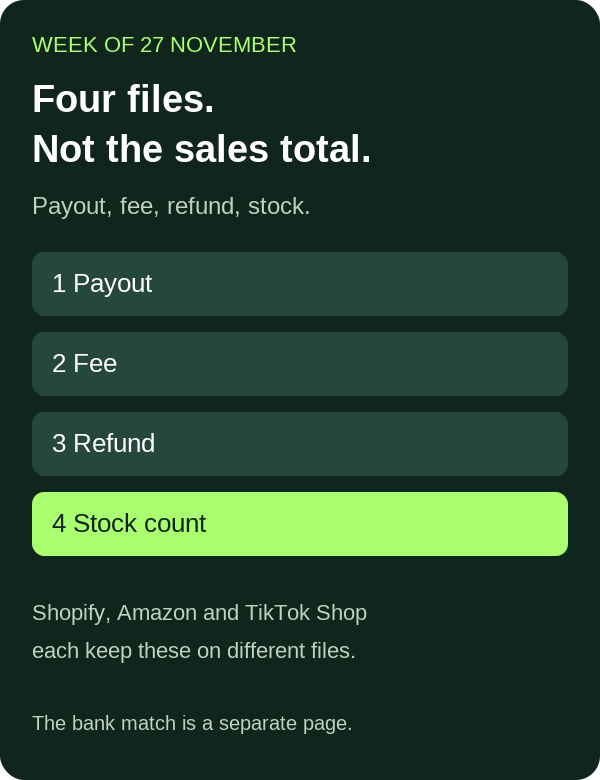
Open the payout, the fee, the refund and the stock file. Do not stop at the sales total. Shopify’s 2026 retail calendar lists Black Friday as 27 November. On that week the sales total, the payout, the fee, the refund and the stock quantity are different files. This page is the check against each platform’s own reports. Matching a payout to the bank is a different job, already written for Shopify, TikTok Shop and PayPal.
This is for a founder-led brand on Shopify, Amazon and TikTok Shop. If the files are missing, the clean-up is Unfck Your Books. The finished-month pack, once the week is over, is what a reliable month end has to prove.
Which file answers which question?
| Question this week | Shopify | Amazon | TikTok Shop |
|---|---|---|---|
| What was sent, or is about to be sent? | Payouts page and the payouts export | Disbursements tab | Finance, then Payouts |
| What fee did the platform take? | Fees on the activity report | amount-description on Flat File V2 | TikTok Shop commission fee, under Fees |
| What was refunded? | The refund deducted from the next payout | Refunds inside the settlement | The refund, which is not the return approval |
| What happened to the unit? | Month-end inventory value | Inventory ledger, Customer Returns | The quantity on TikTok, not another platform |
Why is Friday’s sales total the wrong file?
Shopify’s activity report is balance activity in Shopify Payments. Shopify says revenue in the Finance reports is based on orders and sales, which might use different timing or totals than this report. The activity report has a 3-day data delay, so recent activity might not appear immediately. It needs Shopify Payments. Each payout currency is its own report. It leaves out Shopify billing fees and third-party processors, and Shopify names Authorize.net and Afterpay as examples. A payment that is not Shopify Payments is not in this file. Where the week went through PayPal, use the PayPal payout page rather than this report.
Pending amounts and payout dates are estimates. Shopify says the final payout can change before the funds are sent, because of refunds, chargebacks, reserves, adjustments or processing updates. The payout date is the date Shopify sends it. Deposited means the payout was sent. The bank may still need 1 to 3 business days. The payouts export is one row per payout, with Charges, Refunds, Adjustments, Fees and Total. Use that row for the deposit. Do not paste the sales total into it.
Amazon, in general, settles every two weeks. It takes the beginning balance, adds sales, subtracts expenses, adjusts for refunds, withholds a reserve, and sends one disbursement. After Amazon initiates the payment, the cash can take up to five business days to appear. A deferred transaction is paid at a future date, and on deliveries Amazon typically reserves funds for seven days. A negative or zero balance from expenses or product refunds is a case where Amazon may not initiate payment. Past payouts are on the Disbursements tab. The Statement View shows the date Amazon will attempt the next disbursement, and an estimated amount. Read that date on the page. The payout match itself is tracking Amazon FBA settlements, and the dashboard comparison is the Amazon dashboard page.
What does one refunded Shopify order do?
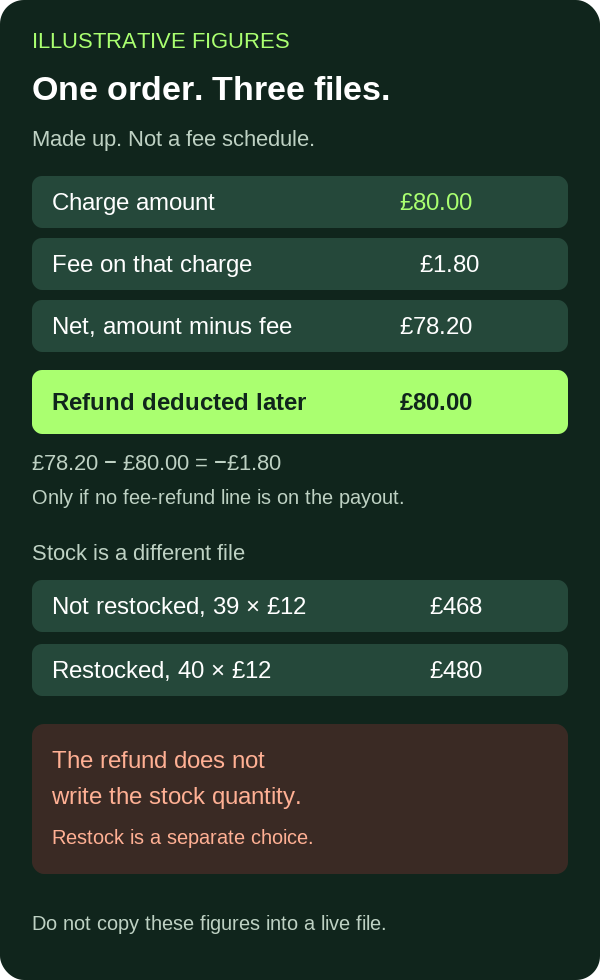
Illustrative figures. The example is synthetic. One Shopify Payments charge. The amounts are made up. On a live order, use the CSV and the payout.
| Line | Illustrative amount | Rule used |
|---|---|---|
| Amount on the charge | £80.00 | Chosen |
| Fee on that charge | £1.80 | Chosen. Not a rate card |
| Net | £78.20 | £80.00 − £1.80 |
| Refund deducted from the next payout | £80.00 | The refunded amount |
| Combined, if no fee-refund line exists | −£1.80 | £78.20 − £80.00 |
On the transaction CSV, Net is the difference between Amount and Fee. £80.00 − £1.80 = £78.20. When you refund through Shopify Payments, the refunded amount is deducted from the next available payout. Shopify says no additional transaction fee is incurred, and the original credit card transaction fee is not refunded. £78.20 − £80.00 = −£1.80. That minus figure uses only those two rules.
The same payouts page lists Fee refund as one adjustment: a refund of the fees for an order that you refunded. If that line is on the payout, it is extra, and the −£1.80 illustration does not include it. Read the transactions. Do not assume the fee came back, and do not assume it stayed, until the line is there or it is not.
Does the refund put the unit back?
Restocking is optional when you process a Shopify return. You select Restock at, then a location. If you do not select it, that step does not add the unit to a location. You can also issue the refund now or later. Those are separate choices from the payout deduction above.
The month-end inventory value report totals on-hand inventory for variants with a cost per item. Total inventory value is the cost per item multiplied by the ending quantity. The sum of those values is the summary row. On-hand includes available, committed and unavailable units, and it excludes incoming units on a transfer. From 1 October 2026 the reports measure on-hand quantity. A month stops updating about two days after it ends, so a file opened on 27 November is not a closed November month. The quantities below are chosen so the multiplication can be read.
| What you did with the unit | Illustrative ending quantity | Cost × quantity |
|---|---|---|
| Not restocked | 39 | £12 × 39 = £468 |
| Restocked | 40 | £12 × 40 = £480 |
The £12 cost is made up. Shopify’s rule is the multiplication. The refund of £80.00 does not set the 39 or the 40.
Leave £80.00, £1.80, £78.20, −£1.80, £12, 39, 40, £468 and £480 out of any live file. They are illustrative. On the week of 27 November, use the export in front of you.
What does Amazon put on the settlement, and what does it put on the stock file?
Amazon’s notice says that on 11 November 2026 the XML settlement report and the older flat-file settlement report are removed. Flat File V2 replaces them. The notice says the change applies to all marketplaces. Flat File V2 is a settlement report. Its amount columns are amount-type, amount-description and amount. The amount-type and amount-description say what the charge or fee is. Every amount sits in the amount column. A row can also carry an order-id, a sku and a quantity-purchased. Amounts use local currency formats. Amazon’s example is 95,00 for the EU rather than 95.00. The report is not a request you schedule. Amazon schedules it.
The inventory ledger is a different Amazon file, for FBA. Amazon describes the summary as a bank statement of your inventory: starting balance, received inventory, customer orders, customer returns, adjustments, removals and ending balance. The columns include Customer Shipments and Customer Returns. The detailed view is the movements in and out of fulfilment centres, including sold, returned, removed, damaged, lost and found, for 18 months. A refund amount on Flat File V2 and a Customer Returns quantity on the ledger are different columns. Read both. Do not copy one into the other.
What does TikTok Shop put on the payout?
After the settlement period, if the balance is positive and the payment and bank details are in Seller Center, TikTok Shop initiates a payout. The minimum payout amount is £1. Payouts run automatically at 02:00 UTC every day. The bank may take 1 to 3 business days. The list is Seller Center, then Finance, then Payouts. Paid means the payout has been credited. Processing means the bank is still processing it, usually 1 to 3 working days. View details opens the statements in that payout. One payout can contain more than one statement. You can export the payouts for a period to Excel. TikTok says the screenshots on that page are only for reference, and that the interface, amounts and rates can differ.
The commission fee is deducted from the order settlement. On the statement it is under Fees, named “TikTok Shop commission fee”. Aggregated figures are under Finance, then Finances overview. Per-transaction fees are under Finance, then Statements. TikTok says those screenshots are mock-ups and that the live interface and rates differ, so the amount in the check is the one on the live statement. If the entire order is returned, TikTok says the full commission fee is refunded to the seller. If part of the order is refunded, TikTok says only the commission fee on the refunded items is refunded. That fee line is not a stock count.
Approving a return does not approve the refund. TikTok says a refund for a return request is not processed until the customer provides proof of the return, or the seller receives the product, whichever is earlier, except where the policy allows a returnless refund. For a change-of-mind return, TikTok says it does not automatically issue the refund: the customer ships the product back or provides proof it was dispatched, unless the refund is returnless. A returnless refund does not require that shipment. The refund and a unit arriving back are not the same event.
TikTok’s product upload tool does not share price or stock with other platforms. It says you update quantity with the bulk edit tool, using the Sale Information template. Another platform’s stock file is not the TikTok quantity. The payout statements are not that quantity either.
What do you tick off in the week of 27 November?
- Export the Shopify payouts for the dates you mean. Read Charges, Refunds, Adjustments, Fees and Total. Treat a pending total as an estimate.
- Open the activity report for one payout currency. Expect the 3-day delay. Third-party processors are not in it.
- On one refunded Shopify order, see whether Restock at was selected, then read ending quantity and total inventory value for that variant.
- On Amazon, open the Disbursements tab and the Flat File V2 settlement report. Read amount-description beside amount. Do not use the older flat file or the XML report. Amazon’s removal date for those two is 11 November 2026.
- For FBA stock, open the inventory ledger and read Customer Shipments and Customer Returns separately from the settlement amount.
- On TikTok Shop, open Finance, then Payouts, then View details. A payout can hold more than one statement.
- Read the live line named TikTok Shop commission fee. If the order was returned in full or in part, use TikTok’s own rule for whether that fee comes back. Do not type a rate into the file.
- Check the TikTok quantity in TikTok. The listing tool does not share stock with other platforms.
A pass is four files you can name. The payout export is not the sales total, the fee is a line on the platform’s own report, the refund is a line of its own, and the stock quantity comes from the stock file. Anything else is a file still to open. The bank match stays on the Shopify, TikTok Shop and PayPal pages.
Frequently asked questions
Is this the payout-to-bank match?
No. This page compares the platform’s own files with each other. The payout-to-bank match is already on the Shopify payout page, the TikTok Shop payout page and the PayPal payout page. Amazon’s version is tracking FBA settlements.
Does a refund put the unit back in stock?
On Shopify, only if you select Restock at and a location. On Amazon FBA, Customer Returns is a column on the inventory ledger, separate from a refund amount on the settlement report. On TikTok Shop, a returnless refund does not require the product to be shipped back, and stock is not shared from another platform.
Will Friday’s Shopify activity report include Friday’s orders?
Shopify says the activity report has a 3-day data delay, so recent activity might not appear immediately. A file exported on 27 November might still be missing the latest activity. Pending payout amounts can still change before the funds are sent.
Does TikTok Shop return the commission fee when the order is refunded?
If the entire order is returned, TikTok says the full commission fee is refunded to the seller. If part of the order is refunded, only the commission fee on the refunded items is refunded. The amount to read is the live statement line named TikTok Shop commission fee. TikTok says the screenshots on that page are mock-ups.
Where does a file that will not match go?
A missing file is a file to fetch before you use the number. Unfck Your Books is the clean-up. The order-level version of a Shopify sales gap is why revenue is higher in Xero than Shopify. The Amazon version is the Amazon dashboard page. Once the month closes, the pack to keep is the month-end proof.
Prepared by Social Commerce Accountants editorial with AI assistance. The example is synthetic and independently checked. This is not a claim of human professional review or personalised tax advice.