
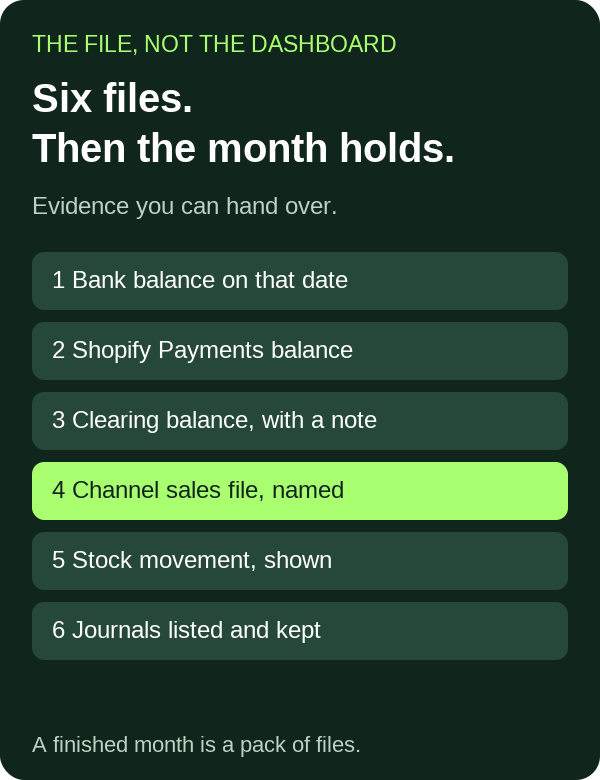
A reliable month end is a set of files you can hand to someone else. Each file is the document that product says is the source for one figure: the bank on that date, the Shopify Payments balance, each clearing account, the channel sales, the stock movement, and the journals dated in the month. A dashboard total with no file beside it is a number the month has not proved.
This is for a founder-led UK brand selling on Shopify, Amazon and TikTok Shop. The 12-step monthly checklist is the close you run. The seven signs are the five-minute record checks when a proof fails. This page is the evidence a finished month has to show.
What does each proof point at?
| Proof | File you keep | What you write on it |
|---|---|---|
| Bank on the month-end date | Bank Reconciliation Summary, exported | The balance you typed, and Calculated balance out by |
| Shopify Payments for the month | Activity report PDF, plus the payouts export | Which total is the balance, and which payouts were sent |
| Shopify sales | Total sales breakdown for the same dates | The column, such as net sales |
| A gateway other than Shopify Payments | The clearing account’s transactions | Why any balance is still there |
| Amazon sales in the ledger | Settlement V2 CSV for those payouts | Release date, and that this is not the orders report |
| TikTok Shop commission | The live statement line | The amount named TikTok Shop commission fee |
| Stock movement | The cost bill, and Shopify’s month-end inventory value | What each document counted |
| Journals dated in the month | Posted tab, Draft tab, Journal Report | What each posted journal is, and which are drafts |
| The pack can be found again | Those PDFs, and the lock date | The date, and whether administrators are included |
What does the bank report prove?
Xero’s Bank Reconciliation Summary shows how the bank balance in Xero is calculated as at the report date. That date is the last day of the pack date range. Open it from Reporting, then All reports, then the Bank Reconciliation pack, or from the bank account menu, Reconciliation report.
When the transactions and the reconciliation are up to date, Xero says the Balance in Xero, the Statement balance (calculated) and the online banking balance for that day should be the same. You type that online balance into Bank statement ending balance. Calculated balance out by is the difference between the figure you typed and the Statement balance (calculated). Leave the box empty and the difference is against the Imported Statement Balance instead. Xero says not all banks import an end balance.
The Statement balance (calculated) is built from the statement lines in Xero, not taken from online banking. Total Unreconciled Statement Lines are imported lines not reconciled as at the report date. A match to a transaction dated after the report still shows as unreconciled. Outstanding payments and receipts are entered transactions that are not reconciled as at that date. Export the summary to PDF or a spreadsheet. That file is the bank proof.
Xero’s Reconcile period screen is a second bank file, for one bank account and a date range. Xero says you cannot close the period until the balances match and every transaction included in the period is reconciled. Once it is closed, those transactions cannot be deleted or unreconciled, and you can still edit their account codes. Export PDF on a closed period is the permanent record Xero describes: a period summary and the reconciled transactions. Editing a closed period puts it back to draft and unlocks the lines. A closed period is evidence. It is also a draft again the moment someone clicks Edit.
What does a Shopify month prove?
Shopify Payments gives you three different documents. The month proves you can say which one you used.
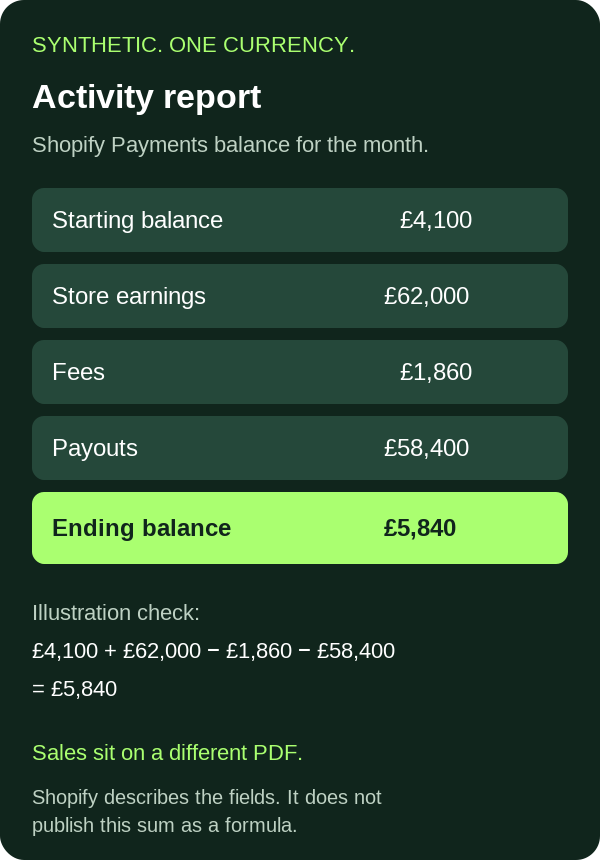
The Shopify Payments activity report is the period file. Shopify says to use it for month-end reconciliation, PDF record keeping and an accountant handoff. Open it from Finance, then Documents. It shows the starting balance, store earnings before fees and payouts, fees, payouts, the net change, and the ending balance. Each payout currency is its own report. It needs Shopify Payments, and someone allowed to view payouts. It leaves out Shopify billing fees and third-party processors such as Authorize.net or Afterpay. Shopify says there is a 3-day data delay, and that the date range can disagree with bank deposits because payouts follow their own schedule. The report is balance activity. Shopify says it is not a statement of revenue. Reserves and holds on it are funds Shopify is holding, and Shopify says they are not revenue from new sales.
The payouts export is the list of payouts, one row each, and Shopify says to use it for a summary of payouts, for example for one month. The payout page is the single deposit: payout amount, the bank account it was sent to, the bank reference when Shopify has one, and a breakdown of charges, refunds, adjustments, fees, reserves and retried payouts. The payout date is the date Shopify sends it. Deposited means the payout was sent. Shopify says the bank may still need 1 to 3 business days to deposit the funds.
The sales file is the finance reports, from Analytics, then Reports, then the Finances category. On the Total sales by order report, Shopify says net sales equates to gross sales minus discounts minus sales reversals, and that net sales does not include shipping charges or taxes. Total sales on that report adds taxes, shipping charges and fees. The payments finance reports are captured payments across gateways. Shopify says net payments there equates to the amount paid minus the amount refunded.
Shopify gives three reasons those reports can disagree. The sales report follows orders placed. The payments report follows payments captured, so an order can sit in one month and the payment in the next. The activity report can still disagree with both, because it follows Shopify Payments balance activity and payout timing. The order-level version of a sales gap is in why revenue is higher in Xero than Shopify.
Where A2X posts a Shopify Payments payout, it arrives in Xero as a draft invoice using the account mappings already set in A2X. You approve the invoice, then match the bank deposit to it. A2X says those Shopify Payments summaries match the bank deposits, and that you generally do not need a clearing account for them. The invoice is the ledger file for that payout. The activity report is the month file Shopify tells you to export for a date range.
What does a clearing account balance prove?
A2X says third-party gateways, including PayPal and Klarna, need a clearing account. Set each one up as its own current asset. A2X’s reason is practical: the processor deducts its fee before the deposit, Shopify and A2X cannot see that fee, and the deposit often arrives later than the order.
A2X’s three steps are: post the payout, which debits the payout amount to the clearing account; categorise the later bank deposit to the same account; then record the fees from the processor’s own statement with a manual journal that credits the clearing account. A2X calls those steps a general guide and says to check them with your accountant. It also says a small balance left at month-end, after those fees are recorded, generally represents funds in transit. A balance that keeps growing is the case it tells you to check: deposits categorised to a sales account, or the fees never recorded. Chargebacks handled on the processor’s own platform are outside the Shopify integration, so A2X says to record those against the clearing account as well.
In Xero, open Accounting, then Chart of accounts, and click the account balance to list the transactions on that clearing account. A2X’s PayPal example in Xero uses an account transactions report for the same look, and it says a high-volume store can still have a small residual because the deposits take time to arrive. The proof is the note on whatever balance is left. The five-minute version of a balance that keeps growing is in the seven signs.
Which file proves the Amazon and TikTok Shop figures?
Amazon sends one disbursement to the bank account on the seller’s payment settings when the balance is positive. In general it settles every two weeks: beginning balance, plus sales, minus expenses, adjusted for refunds, then a reserve withheld. After Amazon initiates the payment, the cash can take up to five business days to appear. The Payments dashboard is Payments, then Payments. Past payouts are on the Disbursements tab. A deferred transaction is one Amazon will pay at a future date, and on deliveries it typically reserves funds for seven days.
Where the ledger is posted by Link My Books, the file is Amazon’s Settlement V2 report. Link My Books says that is the report Amazon uses to calculate payouts, and that orders, date-range transaction, business and inventory reports will not reconcile to it. Download the CSV from Seller Central, then Payments, then Payments, then All Statements, for the payout you are tying. By default Link My Books posts on the settlement release date. It names three reasons a calendar month and that file diverge: a hold until seven days after delivery, B2B orders held for up to 30 days, and a settlement that includes orders placed in one month and released in the next. An add-on can recognise the order in the month it was placed. This page uses the default, so an order-month total and the ledger are allowed to disagree. The line-by-line version, on made-up numbers, is why Amazon dashboard profit differs from the accounts.
TikTok Shop UK says the commission fee is deducted from the order settlement. The fee on each transaction sits in Seller Centre, then Finance, then Statements, under Fees, named “TikTok Shop commission fee”. Aggregated figures are under Finance, then Finances overview. The same page says its screenshots are mock-ups and that the actual interface and rates differ, so the amount in the pack is the one on the live statement. The invoice for the fee is the following month, under Finance, then Invoice Centre, then Platform Service Fee.
What does the stock figure prove?
Shopify’s Month-end inventory value report is a snapshot of inventory tracked in Shopify. Total inventory value is the cost per item multiplied by the ending quantity, and the sum of those values is the summary row. For that report, on-hand inventory includes available units, committed units and unavailable units, and it excludes incoming units on a transfer. The reports include variants that have inventory tracking turned on. Shopify says a month stops updating about two days after it ends. From 1 October 2026 the reports measure on-hand quantity. Data before that date still shows available quantity.
A2X’s Shopify cost entry reads the SKUs and quantities in the payout, multiplies them by cost prices you supply, and posts one amount. The costs can come from Shopify, from Finale or Settle, from a CSV, or from what you type in. The entry credits the inventory asset and debits the cost of goods sold expense. A2X says no cash changes hands. In Xero it posts as a bill whose total is zero. On the payout you can expand the cost line and read the items and costs it used.
A2X’s Amazon cost entry does the same job on the settlement. In Xero it arrives as a draft bill whose total is always zero, and you approve the bill to commit it. A2X attaches the supporting data so the calculation can be rebuilt. When a settlement crosses two months, A2X says it creates a separate cost invoice for each month.
Put the Shopify summary row next to the inventory asset, and put the cost bill next to the movement in that asset. Write what each one counted. The payout quantities and the on-hand snapshot are different counts, so the note is part of the proof.
What do the month’s journals prove?
Xero’s UK guide to journal entries describes an adjusting journal entry as an update to account balances at the end of an accounting period. Accruals, prepayments and unbilled revenue are the examples it gives for income or expenses that span more than one period. The proof on this page is the list of journals, not a rule about which ones to post.
In Xero, the list is Accounting, then Manual journals. The Posted tab and the Draft tab are separate. Xero says the Journal Report shows the manual journals in the general ledger. Deleting a draft removes it, and Xero keeps no record of that draft. A posted journal cannot be deleted. Voiding it reverses the lines on the original date. Reversing it leaves the original in place and creates a new draft that cancels it. You need the administrator role, or the standard role with manual journals, to reverse or cancel them.
A lock date stops users adding or changing transactions dated on or before that date. An administrator sets it under Accounting, then Accounting settings, then Financial settings, then Lock Dates. It can cover every role, or every role except administrators, and an administrator can remove it. Users can still save draft invoices, bills, expense claims and draft manual journals after the date is on.
The pack therefore has two dates on it. The lock date says which roles can still edit a posted transaction in the month. The draft tab says what is still unposted. A closed bank period, from the section above, still allows account-code edits until someone leaves it closed. The files you export are the copy you can hand over.
What does one synthetic month add up to?
Synthetic example, labelled as such. One GBP payout currency, one bank account, Shopify Payments plus one other gateway. The amounts are made up. On a live month, use the figures on that month’s files.
| Line on the Bank Reconciliation Summary | Illustrative amount |
|---|---|
| Bank statement ending balance, the figure you type in | £84,200 |
| Statement balance (calculated) | £84,200 |
| Calculated balance out by | £0 |
Arithmetic from Xero’s own definition: £84,200 − £84,200 = £0. Calculated balance out by is that difference. The illustration stops there. It does not invent a formula for the other totals on the summary.
| Line on the activity report | Illustrative amount |
|---|---|
| Starting balance | £4,100 |
| Store earnings (gross) | £62,000 |
| Fees | £1,860 |
| Payouts | £58,400 |
| Ending balance | £5,840 |
Illustration check: £4,100 + £62,000 − £1,860 − £58,400 = £5,840. Shopify describes those fields. It does not publish this sum as a formula. The £62,000 is balance activity. It is not the sales-report net sales for the same dates, and this example does not force the two to agree.
The other gateway’s clearing account is £640 at month-end in this illustration, after the fees from that processor’s statement have been recorded. A2X says a small balance left at that point generally represents funds in transit. The £640 is a chosen amount, so the note can be read. It is not a fee schedule.
| Stock document | What the illustration counted | Amount |
|---|---|---|
| A2X cost bill for the Shopify payouts | 800 units in those payouts, at £12 | £9,600 |
| Shopify month-end inventory value, summary row | On-hand quantity times cost per item | £71,400 |
800 × £12 = £9,600. That is the shape of A2X’s cost entry: quantity in the payout, times the cost you supplied, posted as one amount. The £71,400 is the snapshot on Shopify’s report. The two figures are not a tie-out to each other. The note in the pack says which units each file counted.
The Posted tab in the illustration has one journal dated in the month, narration “Insurance release”, £300. The Draft tab has one journal, narration “Bill not yet received”, £1,200. The narrations are labels so the list is readable. They are not a list of journals a brand has to post.
Leave £84,200, £4,100, £62,000, £1,860, £58,400, £5,840, £640, £9,600, £71,400, £300 and £1,200 out of any journal. They are not a client month and not a template. The pack is the point: a file, a figure, and a note.
What do you tick off?
- Export the Bank Reconciliation Summary with the online banking balance typed in. Read Calculated balance out by and the unreconciled statement lines.
- If the bank period is closed, export that PDF. Account codes can still be edited, and Edit returns the period to draft.
- Export the Shopify Payments activity report for the month and the payout currency. Label it as balance activity.
- Export the month’s payouts and open one deposit: amount, bank reference, and the breakdown. Deposited means Shopify sent it.
- Name the sales column on the Total sales by order report. Net sales there excludes shipping and taxes.
- Write a note on every clearing balance. A small balance after the processor fees generally represents funds in transit.
- Download the Settlement V2 CSV for the Amazon payouts. The default posting date is the release date.
- Read the TikTok Shop commission off the live statement, under Fees. The policy screenshots are mock-ups.
- Put the Shopify cost bill and the Amazon cost bill next to Shopify’s month-end inventory value, and write what each counted.
- List posted journals and open drafts. A deleted draft leaves no record.
- Read the lock date: the month it covers, whether administrators are included, and that drafts can still be saved.
A pass is a pack. The summary has the balance you typed, the Shopify PDF says it is the payments balance, every clearing balance has a note, the Amazon file is Settlement V2, the stock note says what each report counted, and the journals for the month are listed. Anything else is a file still to fetch before you use the number.
Frequently asked questions
Is this the 12-step monthly checklist?
The 12-step checklist is the close you run. This page is the evidence that close has to leave behind: a file for each figure, and a note where two files are allowed to disagree. Run the twelve steps, then see whether the pack exists.
Is this the seven signs the books are a shitshow?
The seven signs are five-minute checks on the records. This page is what a finished month proves. A growing clearing account fails a sign. A clearing account with a written in-transit balance can still be a pass on this list.
Does the Shopify activity report prove the sales figure?
Shopify says the activity report is not a statement of revenue for accounting purposes. Sales follow orders placed, payments follow captured payments, and the activity report follows the Shopify Payments balance and payout timing. The sales proof is the finance report, with the column named.
Does a clearing balance have to be zero?
A2X says a small balance left at month-end, after the processor fees are recorded, generally represents funds in transit. Shopify Payments, on that same page, generally do not use a clearing account at all. A balance that keeps growing is the one to explain before you use the cash figure.
Does the month-end inventory value have to equal the inventory account?
Shopify’s month-end inventory value is cost per item times on-hand quantity in Shopify. A2X’s cost bill is the quantities inside the payout, times the costs you supplied. The proof is a note of that difference. In the synthetic month the bill is £9,600 and the snapshot is £71,400, and those two amounts are made up.
Where does a failed proof go?
A missing file is a record to fetch or repair. Unfck Your Books is the clean-up. The diagnostic before you rebuild a month is the seven signs, and the close itself is the 12-step checklist. The two tie-outs behind the sales file and the Amazon file are the Xero and Shopify revenue check and the Amazon dashboard bridge.
Prepared by Social Commerce Accountants editorial with AI assistance. The example is synthetic and independently checked. This is not a claim of human professional review or personalised tax advice.