
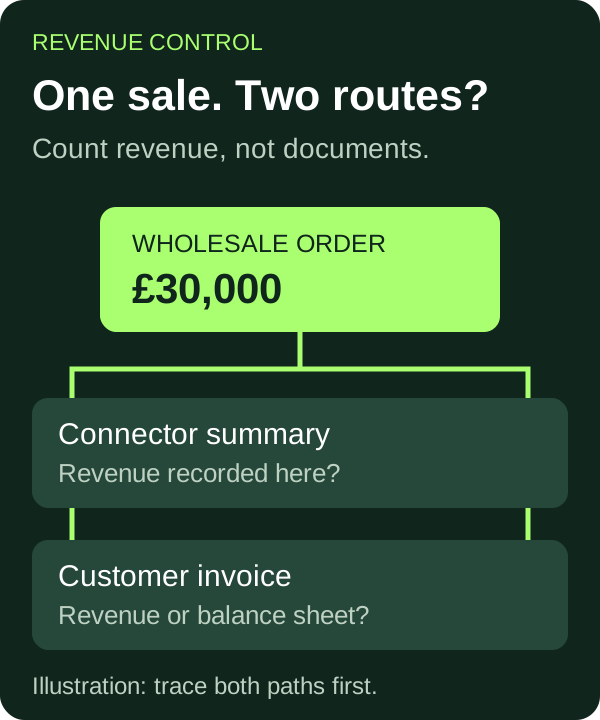
If Xero shows more revenue than Shopify, first compare the same orders, dates, currency and tax basis. Then check whether one sale has reached a revenue account twice. A wholesale order recorded in Shopify and invoiced separately in Xero can create duplication, but two documents are not proof: the second document may correctly use a balance-sheet account instead of revenue.
For a £1m–£20m ecommerce brand mixing direct-to-consumer sales with wholesale, this is a month-end question worth answering before increasing stock orders or ad spend. A sales total inflated by duplicate postings can make growth look better than it is. This guide is a diagnostic process, not instructions to delete transactions or change filed returns.
The £30,000 difference that is not extra growth
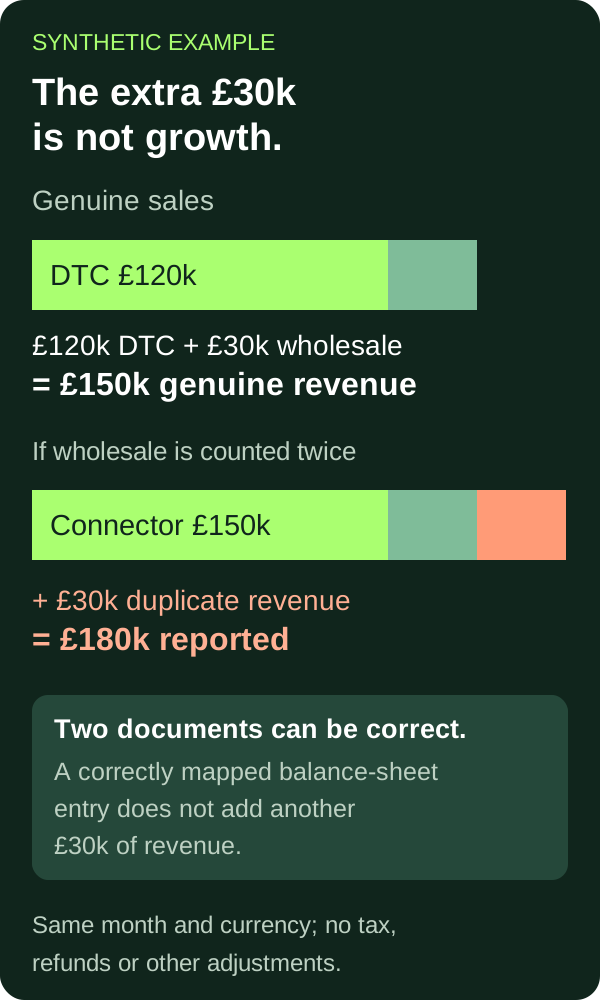
Synthetic example, not a client result: a brand has £120,000 of DTC sales and £30,000 of wholesale sales in one month. All of those orders are recorded in Shopify. Its connector records the full £150,000 as revenue in Xero. The team also raises £30,000 of wholesale invoices in Xero and codes them to a revenue account, without an offset elsewhere.
Reported revenue is now £150,000 + £30,000 = £180,000, although the underlying sales total is £150,000. The overstatement is £30,000, or 20% of the genuine £150,000 total. It is not a new channel win.
For this illustration only, all amounts are revenue excluding tax; dates and currency match; returns, discounts, shipping, exchange differences and revenue-recognition adjustments are excluded. In a real review, reconcile those differences explicitly rather than calling the entire gap a duplicate.
Two invoices can still be correct
Do not identify duplicates by counting documents. In its Shopify B2B mapping guidance for Xero, A2X describes a tagged B2B order appearing in both the normal settlement and an individual B2B invoice. The individual invoice uses the account selected for the A2X B2B item, with a current-asset mapping in the documented setup.
A2X's B2B transaction-flow explanation makes the purpose clear: the core payout records sales, while the separate B2B flow uses a contra asset account to avoid recording those sales again. The payment and reconciliation steps depend on how the customer pays.
That is a product-specific example, not a universal setting for your integration. In our simplified £150,000 example, a separate customer invoice that adds no revenue does not create the extra £30,000 of sales shown above. Its balance-sheet and payment entries still need to reconcile. Ask what the documents do to the ledger, not merely whether both exist.
Trace one wholesale order all the way through
Start with one ordinary completed order, not the monthly total. Use a separate sample for a refund, a part-payment or a foreign-currency order. Keep an evidence trail with these six checkpoints:
- Order identity: Shopify order number, customer, order date and the actual wholesale or B2B identifier used by your workflow. Confirm that the Xero invoice represents that same order, not another shipment or instalment.
- Connector coverage: find the order in the detail behind the connector's summary. Record the summary reference and the exact amount included. A similar monthly total is not enough.
- Xero postings: inspect the accounts affected by both the summary and the customer invoice, including any offset. Separate revenue-account entries from receivables and other balance-sheet entries.
- Payment trail: trace the receipt to the customer balance or clearing account specified by your integration. Do not treat a bank receipt as a second sale simply because it needs reconciliation.
- Adjustments: follow credits, refunds and reversals using the original order reference. A sale and a reversing entry are not two sales.
- Period boundary: check order, invoice, posting and payment dates, plus the report's accounting basis. A timing difference needs a timing explanation, not deletion.
The output should be a short statement your accountant can verify: “Order X is included in summary Y and invoice Z; these are the revenue entries and these are the offsetting entries.” If you cannot show that chain, the diagnosis is unfinished.
Check which system owns each posting
List every app and manual process that can send sales to Xero. Include old integrations left running after a migration, wholesale invoicing, inventory software and manual month-end journals. Record each system's scope, start date and destination accounts. A useful ownership rule is: one defined route records revenue for each order population; any additional documents must have a documented purpose and reconciliation.
This is not a theoretical integration risk. In its guidance on using A2X with sku.io, A2X recommends a division in which A2X handles sales and sku.io handles inventory and cost of goods sold, and warns that sales syncing from both can double-count revenue. That guidance applies to that pairing; other stacks need their own verified ownership map.
Then test the month, not just your sample. Group the relevant order IDs, compare their source totals with the revenue entries, and list every unexplained difference. Check missing sales as well as duplicates. A fix that removes duplication by excluding genuine wholesale sales is not a fix.
Correct the cause without losing the audit trail
Before changing a live sync, preserve the order export, connector detail, Xero account transactions and current settings. Agree the intended posting route with the accountant and integration provider. Test that route on a controlled sample, including the separate customer invoice and its payment where relevant.
Do not bulk-delete invoices, remove bank matches or switch every wholesale line to a clearing account to force a total to agree. The right correction depends on which entry is wrong, what has already been paid or reported, and which documents customers need. Filed-period or tax-sensitive corrections require a specific review; this article does not establish their treatment.
Close the issue only when three checks pass: revenue agrees to the supported order population; customer balances agree to invoices, credits and receipts; and relevant clearing accounts have explained balances. Recheck the following month so the same duplicated feed does not quietly return.
What to bring to a review
Bring one affected month's order export, the connector's detailed reports, the Xero revenue-account transactions, the wholesale invoices and a list of active integrations. Include one fully traced order and your unresolved differences. Remove unnecessary personal customer data from anything shared for an initial discussion.
If your Shopify and Xero numbers disagree, Unfck Your Books is a practical starting point for diagnosing the underlying records. Once those numbers are dependable, fractional CFO support can help turn them into channel and cash decisions. Better decisions start with knowing whether the growth in the ledger actually happened.
Prepared by Social Commerce Accountants editorial with AI assistance. The example is synthetic and independently checked. This is not a claim of human professional review or personalised tax advice.