
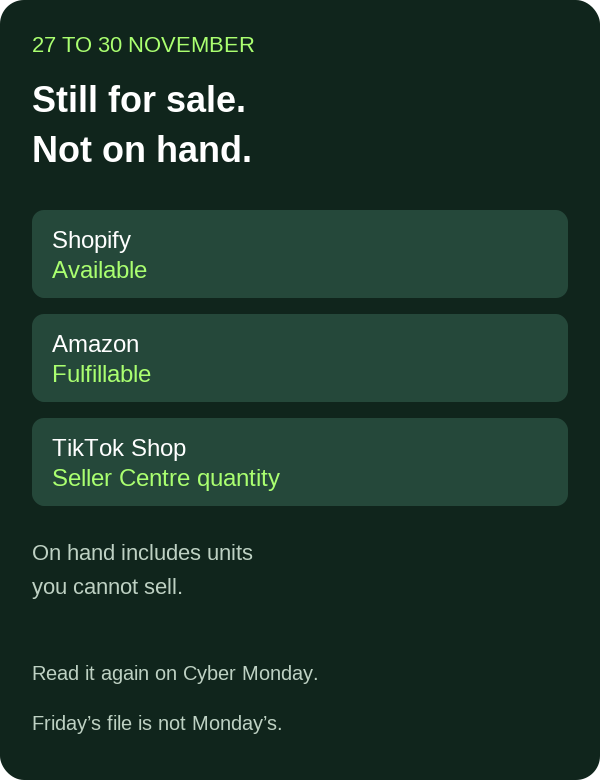
Sell from Shopify’s Available quantity, Amazon’s fulfillable quantity, and the quantity in TikTok Shop Seller Centre. On hand, a warehouse total and another channel’s stock are different numbers. Shopify’s 2026 retail calendar lists Black Friday as 27 November and Cyber Monday as 30 November. The quantity still for sale can move on each of those days. This page is that check. The payout, the fee, the refund and the month-end stock file are already on the Black Friday file page. A refund’s month is the TikTok Shop cut-off page. Neither page is the quantity a customer can still buy.
This is for a founder-led brand on Shopify, Amazon and TikTok Shop. When the three quantities and the warehouse count are different numbers, the stock work sits on the inventory page. When the books are the mess, the clean-up is Unfck Your Books. The closed month, after 30 November, is what a reliable month end has to prove.
Which number is still for sale?
| Channel | Read this | Do not sell from this |
|---|---|---|
| Shopify | Available, at a location that fulfils the variant | On hand. It includes committed and unavailable units |
| Amazon, FBA | afn-fulfillable-quantity on the Manage Inventory report | afn-warehouse-quantity, afn-total-quantity, or a reserved column |
| TikTok Shop | The quantity in Seller Centre, including a Sale Information upload if that is how you edit it | A Shopify or Amazon quantity, unless a separate sync is the one you actually use |
Why is Shopify’s on-hand figure the wrong one?
Shopify says on-hand inventory is the sum of committed, unavailable and available. Available is what you can sell. It is not committed, it is not set aside as unavailable, and it does not include incoming. Committed units are set aside and cannot be sold, including units on an unfulfilled order, units reserved on a draft order, and units on a transfer marked ready to ship. Unavailable units are at the location but not for sale, including units an app has set aside and units held as damaged, quality control or safety stock. Incoming units are on the way. They are not for sale until they are received and the state changes to available.
The states page says you enter inventory and turn tracking on so the states can be determined. On the Inventory page, Available, Committed, Unavailable, On hand and Incoming are separate columns. At a location that does not fulfil the variant, Available is a dash. On hand can still show. If you edit On hand, Available changes by the same amount. If you edit Available, On hand changes by the same amount. Typing a new on-hand number on 27 November moves the quantity customers can buy.
Shopify’s published example, not a live shop and not a Black Friday export. Shopify’s page uses a jam shop. The units below are the ones Shopify states. The addition is the sum Shopify describes.
| State in Shopify’s example | Units | Shopify’s description |
|---|---|---|
| Committed | 10 | Placed orders, or reserved for draft orders |
| Unavailable | 6 | Damaged, or set aside by an app |
| Available | 4 | Ready to be sold |
| On hand | 20 | 10 + 6 + 4 |
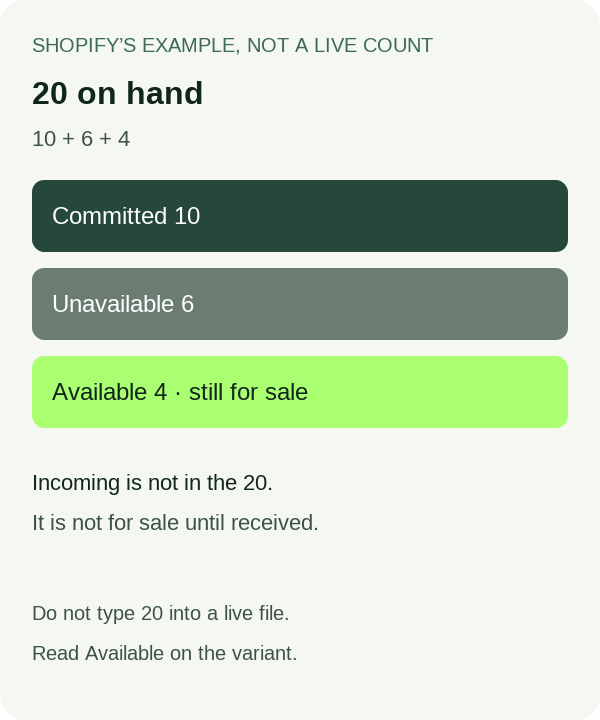
Leave 10, 6, 4 and 20 out of any live file. They are Shopify’s example. On 27 November, read Available on the variant in front of you.
Can a customer still buy when Available is zero?
Shopify says an item is out of stock when inventory is tracked and the inventory level is at zero or below. By default, customers cannot buy it until you add stock. You can turn on Continue selling when out of stock, and only when Inventory tracked is on. Shopify names pre-order, stock that is coming, selling before you order supplies, and not tracking the quantity in Shopify as reasons a store might allow that. The states page says you enter inventory and turn tracking on so the states can be determined. The out-of-stock page is the separate control for whether customers can still buy when the level is zero or below.
Continue selling when out of stock does not apply to orders placed from Shopify POS. Staff can keep selling when available inventory reaches zero and below. POS warns them before they sell an item that is not available. Online and the till are not the same switch.
Locations matter on the same page. If the location that fulfils online orders is at zero or below, and another location has stock but does not fulfil online orders, the online store still shows the item as out of stock. Customers can buy it when you add stock to the location that fulfils online orders. A back-room count is not the online Available quantity.
Which Amazon column can a customer still buy?
Amazon describes Fulfillable as inventory that can be picked, packed and shipped. Inbound is on its way to the fulfilment network. Reserved is in the network and is being picked, packed and shipped, or it is sidelined for measurement, sampling or other internal processes. Unfulfillable cannot be sold. Researching is misplaced or warehouse-damaged units being confirmed at a fulfilment centre. Fulfillable is the quantity this check uses. The others are not substitutes for it.
On the FBA Manage Inventory report, the column is afn-fulfillable-quantity. The same report also has afn-warehouse-quantity, afn-unsellable-quantity, afn-reserved-quantity, afn-total-quantity, three inbound quantities, afn-researching-quantity, afn-fc-transfer-quantity and afn-onhand-buyable-quantity. They are separate columns. The report is for active inventory, not archived inventory. Amazon says its content is updated in near real time, and that you request the report. You do not schedule it.
A near real-time FBA report is generated no more than once every 30 minutes. After Amazon generates one because you requested it, 30 minutes have to pass before Amazon will generate an updated version. The times here are only that wait: a report generated at 09:00 cannot be generated again until 09:30. They are not a file from a shop. Request it again when the wait has passed. Do not treat the morning file as Cyber Monday.
Reserved units are a different report, GET_RESERVED_INVENTORY_DATA. Amazon says it is the number of reserved units, updated in near real time, and that you can only request it. The columns include reserved_qty, reserved_customerorders and reserved_fc-processing. Amazon also lists reserved_staging for the UK store, and for the US, Canada, Japan, Germany, France, Italy and Spain stores. Read those columns as reserved. Do not add them to afn-fulfillable-quantity.
Does TikTok Shop use Shopify’s quantity?
No, not from the Product Upload Accelerator. TikTok says that tool is a product listing tool, not an integration, and that price and stock are not shared or updated with other platforms. To change quantity after that upload, use Bulk edit and the Sale Information template. A sold-out Shopify product does not, by that tool, become a sold-out TikTok listing.
Warehouse mapping is a different setup. TikTok says you map the Shopify warehouse to TikTok Shop so that, when orders are generated, the stock level is updated automatically. The path TikTok gives is Shopify, then TikTok, then Shop Management, then Shop settings, then Fulfilment, then Warehouse settings. If that mapping is not what you saved, the upload-tool rule above is the one that applies. Read the quantity in Seller Centre either way.
When an order arrives, TikTok says you review inventory and check the item is in stock and available for sale. TikTok says sellers keep stock levels accurate. It says not to keep a high level of inventory in Seller Centre that is not physically in the warehouse. It also says not to print a shipping label without checking there is sufficient stock to fulfil the order. That stock check is the warehouse. It is not the Shopify Available figure.
What do you check from 27 to 30 November?
- On Shopify, open the variant and read Available at the location that fulfils online orders. A dash means that location does not fulfil the variant.
- Read Committed, Unavailable and Incoming before you edit On hand. Editing On hand changes Available by the same amount.
- If the product should stop at zero, check that Continue selling when out of stock is off. It can be on only when tracking is on, and it does not apply to Shopify POS.
- On Amazon, request FBA Manage Inventory and read afn-fulfillable-quantity. Wait 30 minutes before you request an updated near real-time report.
- Request the reserved report if units have moved off fulfillable. Keep reserved_customerorders, reserved_fc-processing and reserved_staging out of the fulfillable column.
- On TikTok Shop, read the quantity in Seller Centre. The upload accelerator does not share stock. If you use warehouse mapping, TikTok’s update is the one that runs when orders are generated.
- Before a label, use TikTok’s own checks: the ordered item is in stock and available for sale, and do not keep a high level of inventory in Seller Centre that is not physically in the warehouse. TikTok tells you not to print the label without checking there is sufficient stock to fulfil the order.
- Do the same three reads on 30 November. Friday morning’s export is not Cyber Monday’s quantity.
A pass is three names. Shopify Available, Amazon afn-fulfillable-quantity, and the TikTok Shop quantity in Seller Centre. On hand, a reserved column and another channel’s export are still to be read, not sold. The month-end stock file stays on the file page.
Frequently asked questions
Is on hand the quantity I can still sell on Shopify?
No. On hand is committed plus unavailable plus available. In Shopify’s jam example that is 10 + 6 + 4 = 20, and the quantity ready to sell is 4. Incoming is not in that sum, and it is not for sale until it is received.
Will a zero on Shopify stop the TikTok Shop listing?
Not from the product upload tool. TikTok says that tool does not share stock with other platforms. Warehouse mapping is separate, and TikTok says the stock level updates when orders are generated. Read the quantity in Seller Centre.
How current is Amazon’s fulfillable quantity on Black Friday?
The Manage Inventory report is a near real-time FBA report, and Amazon generates that kind of report no more than once every 30 minutes. You request it. A download from early on 27 November is not the quantity on 30 November.
Does Continue selling when out of stock apply at the till?
No. Shopify says it does not apply to orders placed from Shopify POS. Staff can keep selling when available inventory is zero or below, and POS warns them before they sell an item that is not available.