
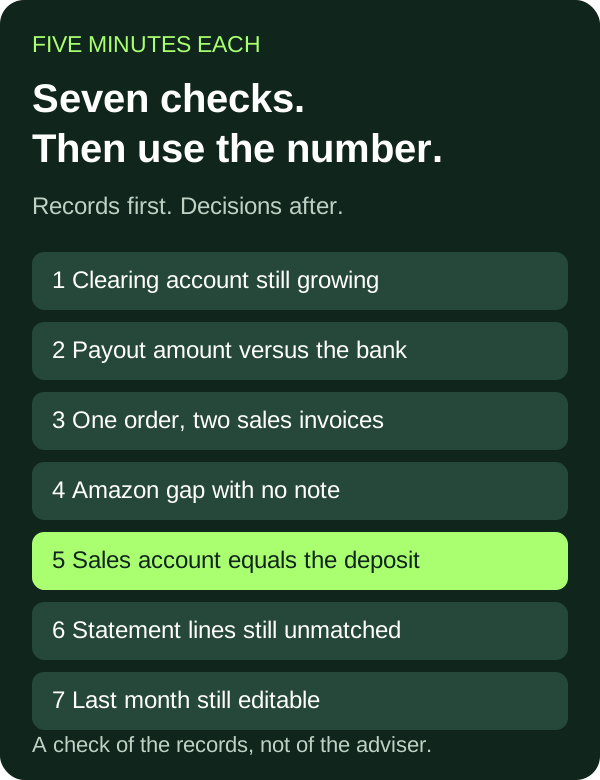
Seven checks tell you whether the books can be used. Each one takes about five minutes in Xero, or on the payout screen that Xero is supposed to match. When a check fails, the cost is practical: a decision, a cash figure, a month-end or a diligence pack is using a number the records do not support.
This is for a founder-led UK brand at roughly £1m–£20m, selling on Shopify, Amazon and TikTok Shop. It is a diagnostic of the records. The seven signs you have outgrown your accountant are about the adviser. The 12-step monthly checklist is the close you run once these records can hold a month. Do this first.
What does each sign break?
| Sign | 5-minute check | What it breaks |
|---|---|---|
| A clearing account keeps growing | Open its balance in the chart of accounts | Cash visibility |
| The payout is not the bank line | Match one payout amount to one statement line | Cash visibility and month-end |
| One order, two sales invoices | Search one order number in Xero | Decisions |
| Amazon profit with no note | Put both figures side by side and look for a note | Decisions |
| The sales account is the deposit | Compare one payout’s lines with the sales account | Decisions, month-end and diligence |
| Statement lines still unmatched | Read Unreconciled Statement Lines on the summary | Cash visibility, month-end and diligence |
| Last month can still be edited | Open Lock Dates and read the date | Month-end, decisions and diligence |
Is a clearing account still growing?
A2X says Shopify Payments deposits typically match the bank, and that you generally do not need a clearing account for them. For other gateways it names, including PayPal and Klarna, it says to use a separate current-asset clearing account per gateway. Its steps record the payout amount on that account, then categorise the later bank deposit to the same account. A2X says a small balance left at month-end, after those fees are recorded, generally represents funds in transit. If the balance keeps growing, its troubleshooting says to check that deposits were categorised to the clearing account rather than a sales account, and that the processor fees were recorded. A2X cannot see those gateway fees, so they are taken from the processor’s own statement.
In Xero, open Accounting, then Chart of accounts, and click the account balance. That opens the transactions on the clearing account. A growing balance is the sign, including fees that were never recorded. A small balance left after the fees are recorded can be the in-transit case A2X describes, so do not treat every balance as an error. What it costs you is cash visibility: the bank can look finished while this account still holds an unexplained balance.
Does the payout equal the bank line?
Shopify’s payout page shows the payout amount, the bank account it was sent to, and the bank reference when Shopify has one. The payout date is the date Shopify sends it. After that, Shopify says it typically takes 1 to 3 business days to arrive, depending on the bank. A status of Deposited means the payout was sent. It does not mean the funds are in the account yet.
Amazon sends one disbursement to the bank account on the seller’s payment settings when the balance is positive. In general it settles every two weeks: beginning balance, plus sales, minus expenses, adjusted for refunds, then a reserve withheld. After Amazon initiates the payment, it can take up to five business days to appear. Past payouts are on the Disbursements tab. Open Payments, then Payments, for the dashboard, then Disbursements.
TikTok Shop UK says the commission fee is deducted from the order settlement, and that the fee on each transaction sits in Seller Centre, then Finance, then Statements, under Fees, named “TikTok Shop commission fee”. The same page says its screenshots are mock-ups and that the actual interface and rates differ, so read the amount on the live statement.
Five minutes: write one payout amount and its reference, then search that amount on Xero’s Reconcile tab. Inside the window the platform states, a missing line can be the bank still processing. Outside it, the cash the platform says it sent is not on the statement you are holding. Month-end cannot close cash to a payout you have not found.
Is one order on two sales invoices?
A2X’s guide for using it with sku.io says that duplicate sales invoices in Xero are a reason to check one setting: Sync Sales Order, disabled on every sku.io channel, not only the primary one. That is the check it names. Sync Sales Credit is a separate setup toggle on the same page, and the setup steps say to turn that off on each channel too. Duplicate invoices are not, by themselves, proof that both systems are posting sales. The recommended split for that pairing is that A2X posts the sales and sku.io posts the inventory entries.
In Xero, search one order number and count the sales-account lines. Two sales invoices for one order is the sign. Two documents are not automatically two sales: a second document can be doing a different job. The trace for a wholesale order that also has a customer invoice is in why revenue is higher in Xero than Shopify. What it costs you is the decision. A stock order or an ad budget that uses the sales account is using a total that counted the order more than once.
Can you explain the Amazon profit gap?
Link My Books’ default posts on the date the settlement is released, not the date the order was placed, and it posts from Amazon’s Settlement V2 file. Orders, date-range, business and inventory reports will not reconcile to that file. Download it from Seller Central, then Payments, then Payments, then All Statements. Amazon says a deferred transaction is paid at a future date, and that on deliveries it typically reserves funds for seven days. An order-month profit and a release-date profit are allowed to disagree. Link My Books also says an add-on can recognise the order in the month it was placed. This check uses the default.
Write both profit figures for one month. If you cannot point at a note that lists the release-date difference, the gap is unexplained. The line-by-line version, on made-up numbers, is why Amazon dashboard profit differs from the accounts. What it costs you is the decision you take on the figure that has no note.
Is the sales account just the deposit?
A Shopify payout’s details list charges, refunds, adjustments, fees, reserves and retried payouts separately from the payout amount. The payout export has columns for charges, refunds, fees and the total, plus the other columns on that file. A2X sends a Shopify Payments payout to Xero as a draft invoice, using the account mappings already set in A2X. You approve the invoice, then match the bank deposit to it. The payout lines sit on the invoice. The bank line is matched to that invoice.
Synthetic example, labelled as such. One Shopify Payments payout. The amounts are made up. In this illustration, charges £12,400 minus refunds £900 minus fees £372 equals a payout of £11,128, and every other export column is £0. Shopify lists those columns. It does not publish this sum as a formula. On a live payout, use the amount and the breakdown on that payout.
| Line | On the payout | Deposit coded to sales |
|---|---|---|
| Charges | £12,400 | Not in the ledger |
| Refunds | £900 | £0 |
| Fees | £372 | £0 |
| Other export columns | £0 | £0 |
| Payout, which is the bank deposit | £11,128 | £11,128 in the sales account |
Arithmetic: £12,400 − £900 − £372 = £11,128. The sales account in the deposit-only version is £11,128, which is £1,272 below the charges. Refunds plus fees are £900 + £372 = £1,272. The £1,272 is not missing cash. The bank still received £11,128. The refund and the fee are on the payout and not in the ledger.
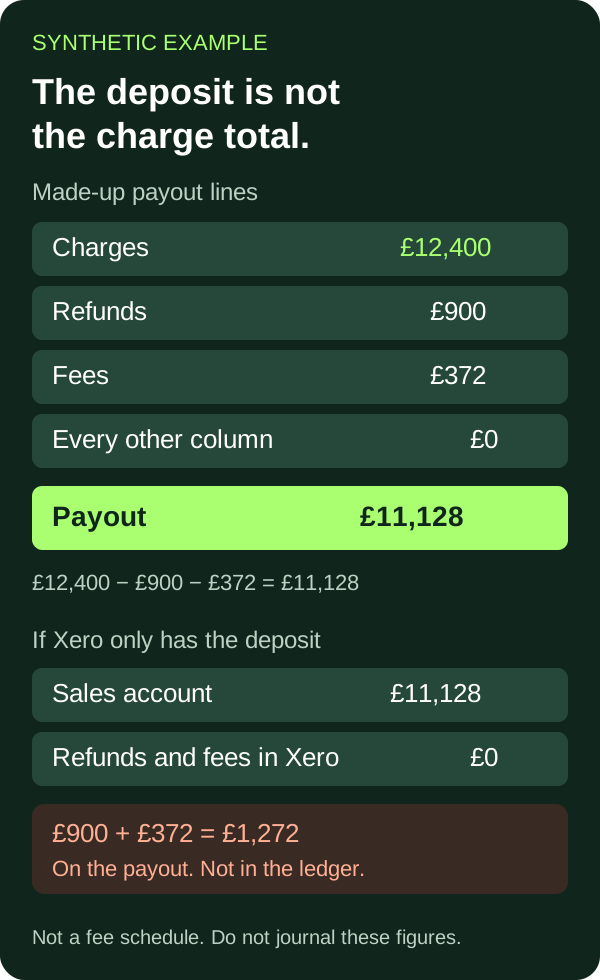
Do not copy £12,400, £900, £372 or £11,128 into a journal. They are not a fee schedule and not a client result. The shape is the point: the payout file has lines, and a sales account that equals the deposit does not.
What it costs you is the decision, the month-end and the diligence. Anyone reading that sales account is reading the deposit. The fee and the refund are invisible, so the margin conversation has nothing in the accounts to point at.
Are bank statement lines still unmatched?
Xero’s Bank Reconciliation Summary has a total called Unreconciled Statement Lines: statement lines imported for that bank account and not reconciled as at the report date. Xero says that when the transactions and the reconciliation are up to date on that date, the balance in Xero, the calculated statement balance and the balance in online banking for that day should be the same. You type the online banking balance in. The report then shows the difference as Calculated balance out by. A statement line matched to a transaction dated after the report date still shows as unreconciled on that report.
Run it from Reporting, then All reports, then Bank Reconciliation. The summary uses the last day of the pack date range. You can also open it from the bank account menu, Reconciliation report. On the way in, the bank account widget shows how many statement lines are ready to reconcile. If Reconcile items does not display, Xero says there are no statement lines to reconcile. What it costs you is the cash figure and the month. A buyer who asks whether the bank matches is asking for this report.
Can last month still be edited?
Xero’s lock date stops users adding or editing transactions dated on or before that date. An administrator sets it under Accounting, then Accounting settings, then Financial settings, then Lock Dates. Xero says you can set it for all user roles, or for all roles except administrators, and that an administrator can remove the date. Users can still create draft invoices, bills and expense claims, and save draft manual journals, after a lock date is on.
Open that screen. If the date is empty, or it stops before the month you are using, that month is not locked. Xero says one option covers every role and the other leaves administrators able to edit. If you cannot see which option is on, the check is unfinished, because an administrator can still change the month. What it costs you is the month-end and any decision that used the number. A diligence pack for a month that can still be edited is not a fixed set of records. A lock date is also not a promise that no draft exists.
What do you tick off?
- Open the gateway clearing account from the chart of accounts. A small balance left after the fees are recorded generally represents funds in transit. A balance that keeps growing is the case to check, including fees that were never recorded.
- Match one Shopify payout, or one Amazon disbursement, to one bank line, and write down whether you are inside the arrival window. Shopify: 1 to 3 business days after it sends the payout, and Deposited means sent. Amazon: up to five business days after it initiates the payment.
- Search one order in Xero and count the sales-account lines. If sku.io is also connected, the check A2X names is Sync Sales Order, disabled on every channel and not only the primary one. Sync Sales Credit is a setup toggle to disable on each channel.
- Put the Amazon order-month profit next to the accounts and find the note. The default posting date is the settlement release date. The file is Settlement V2.
- Open one payout and see whether its charges, refunds and fees are in the ledger, or whether the sales account is only the deposit. Shopify lists those lines separately from the payout amount.
- Run the Bank Reconciliation Summary for the month and read Unreconciled Statement Lines and Calculated balance out by. Xero’s summary is the report that shows both.
- Read the lock date. Note whether it covers the month, whether administrators are included, and that drafts can still be saved. Xero sets that date under Financial settings.
A pass is boring. The clearing balance is explained, the payout is on the bank line, one order hits sales once, the Amazon gap has a note, the payout lines are in the ledger, the summary has no unmatched lines for that date, and a lock date covers the month. Anything else is a record to fix before you use the number.
Frequently asked questions
Is this the same as the seven signs you have outgrown your accountant?
No. That list is about the adviser. This list is about the records you can open yourself. A useful adviser can still be sitting on a clearing account that never clears. The adviser list is the seven signs you have outgrown your accountant.
Is this the 12-step monthly checklist?
No. The 12-step checklist is the monthly close. These seven checks tell you whether the records can survive that close. Run them before you start the twelve steps.
Does a clearing-account balance always mean the books are wrong?
No. A2X says a small balance left at month-end after the fees are recorded generally represents funds in transit. A balance that keeps growing is the case it tells you to check: deposits categorised to a sales account, or those fees never recorded. Shopify Payments, on that same page, generally do not use a clearing account at all.
Does Deposited mean the Shopify cash is in the bank?
No. Shopify says Deposited means the payout was sent to your bank, and that the bank may still need 1 to 3 business days to deposit the funds. Amazon says that after it initiates a payment, the funds can take up to five business days to appear.
Where do you take a failed check?
A failed check is a record to repair, not a new dashboard. Unfck Your Books is the clean-up. The two tie-outs behind the duplicate-sales sign and the Amazon date sign are the Xero and Shopify revenue check and the Amazon dashboard bridge. Channel work after the records hold a month sits on Shopify, Amazon and TikTok Shop. Once a month survives this list, fractional CFO support is where those numbers turn into stock and cash decisions.
Prepared by Social Commerce Accountants editorial with AI assistance. The example is synthetic and independently checked. This is not a claim of human professional review or personalised tax advice.